
Leveraging Technical SEO in Nigeria helps to structure your website for better performance. Get insights to optimize your site for higher search rankings from this Technical SEO guide.
The process of intentionally structuring websites for better optimisation through web page organisation and restructuring is referred to as technical SEO. There’s a lot that goes into technical SEO to fix your site and in this guide, I will breakdoythe details for you.
There are several approaches to Search Engine Optimisation (SEO ), the most popular method is importing your on-page content – such as crafting better headlines, refining web copies, reaching out for top-quality back links all with the ultimate goal of having a website that can compete effectively on search.
The desire to rank high on search engines is a good luxury every small business must seek to achieve, while the above mentioned SEO are good steps on the right direction, you need in-depth technical SEO to build a website that can be on top spots on search engines.
What is Technical SEO?
T-SEO simply stands for Technical Search Engine Optimisation and can be explained as the process that goes into improving a websites visibility an overall functionality to achieve better rankings on search engines. It involves fixing the server load times, responsiveness, navigation issues, accessibility issues and content quality issues for better user experience.
Technical SEO is not necessarily a tweak to attract search engines, but to intentionally improve the experience of users.
T-SEO is more like an extension of on-page SEO – it focuses on meticulously fixing your page quality.
How search engines discover your site?
Once your web is live and pages are indexed, search engines crawlers or spiders are responsible for indexing your web pages to make your content and money pages discoverable to prospects. However, your web pages must fulfil certain ranking criteria to be visible on search results. These ranking criteria is a combination of how well you implemented your on-page SEO, off-page SEO and technical SEO.
Technical optimisation criteria:
- Fast loading pages
- Quality site architecture
- Simple and effective navigation
- Individual page quality
- Unique content
- Good internal link practice
- HTTPS protocol
Why is technical SEO important for your business website?
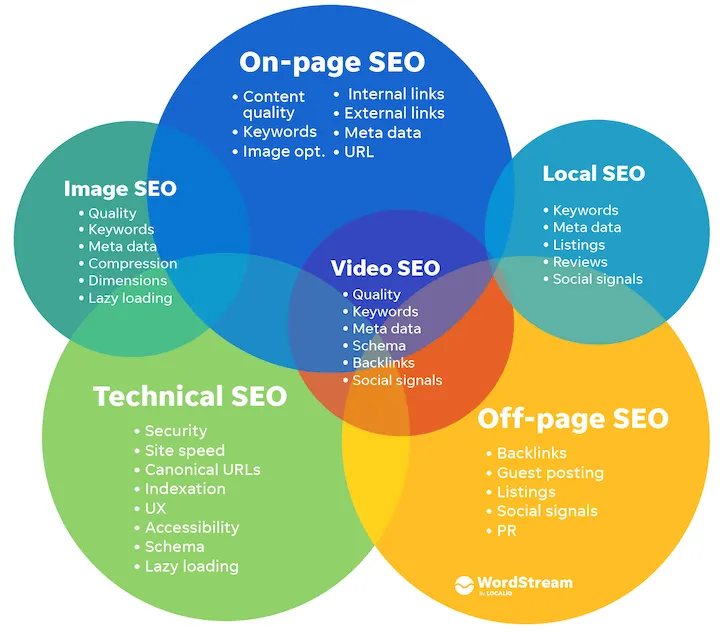
The more your website is crafted to fulfil these technical SEO criteria, the better the chances on ranking on top spot for keywords that matters to your business. Sites that don’t meet this quality checks find it difficult to be indexed these days as google is being economical with its crawl resources.
When your web pages or entire site isn’t indexed it becomes frustrating for any business site and that can lead to loss of traffic, decline in sales and loss of initial investment into building your web presence.
So, it can’t be overstated that the page speed, good site structure and mobile friendliness are the major factors Google uses to rank your website.
9 Technical SEO tips for your small business website
1. Pages Optimisation
Your important pages are responsible for converting prospects into clients or customers. These are the pages that projects your offers as a service based business or your products as an ecommerce .
So, when crafting your web pages, make sure you make them as impactful as possible, use some quality imageries and videos where necessary.
The more visual appealing your important pages are the better you can communicate your offers uniquely to your clients-to-be.
Also make sure there’s a connecting point from one pages to other pages. This is useful for better customer journey, orphan pages that don’t link to other pages contributes to SEO fails.
2. Categorisation
If you have an ecommerce website or website with lots of pages, then you should use categorisation to organise your content. These pages will help to give more context to not just search crawlers but also helps prospective customers to explore your product Catalog easily and attract more quality traffic to your site.
The general rule of thumb here is to logically optimise your website by putting related products together in the same buck called category. For example, you can have categories such as shirts, watches, cologne, etc if you run a fashion Ecommerce website.
3. Directory URL structuring
Related to this is interlinking related bucket or category pages together. For example, you can have a category pages for women clothing and a sub category such as blouses, pants etc. this will help search engines to better understand your website contextually.
If you’re on an ecommerce that doesn’t support this type of URL structure, like Shopify, then you can consider optimising your URLs correctly.
4. Implement Structured data markup
For search engines to understand your pages and overall site structure better using structured data is a standard practice. Structured data is basically adding snippets and specific labels on your content depending on the type of content. You can use simple code (like Schema.org) to convey the meaning of specific words to search engines .
This way, you can make your product listing and service pages outstanding on google search result pages. You can also use tools like the free Google’s Markup Helper to implement this feature for your web. Use the Google’s Rich Results Tool to make sure your implementation are done correctly.
The type of markup for each page will depend on the the type of page – there are markups for events, local services, blogs, recipes, and more.
5. Use Google’s PageSpeed Insights tool
Google has some free tools you can use to improve your site. PageSpeed Insights is a notable one, it allows you to see the web’s loading speed on different devices such as phones/computers as well as suggests possible fixes to better improve your site.
Performing a Mobile-Friendly Test will help you affirm that your website is built to be responsive not just for desktop users but also for users on smartphone devices.
Use the Google’s Search Console report and errors, search terms bringing visitors, and other metrics from GSC to measure real user speed and experience .(Core Web Vitals).
6. Organize Site Architecture
A simple website structure will help to keep your pages simple to understand as well as connect to other pages on the site. Your web structure should be logical such that the Homepage links to> Main Sections link to > Specific Pages.
Your most important pages should be more than 2 to 3 clicks away from your homepage and vice versa.
This is where the proper URL structuring as mentioned earlier is needful. For example, if you run a service business, your service pages should be structured this way: yourbusiness.com.ng/services/tutoring.
Make sure to recall empty on non-developed pages, if you’re yet to build them or have hopes to publish those pages later. Then keep them in pending or draft and not as published or live pages, so your customer experience doesn’t tank even more.
Once all your pages have been built out, and you have a minimum viable website that you can launch, then proceed to your Google Search Console to a sitemap have it submitted.
An XML sitemap is a directory list of all pages on your site. There’s a section on Google Search Console where you can submit these. It helps google crawlers to navigate your web pages more easily and also index your pages faster.
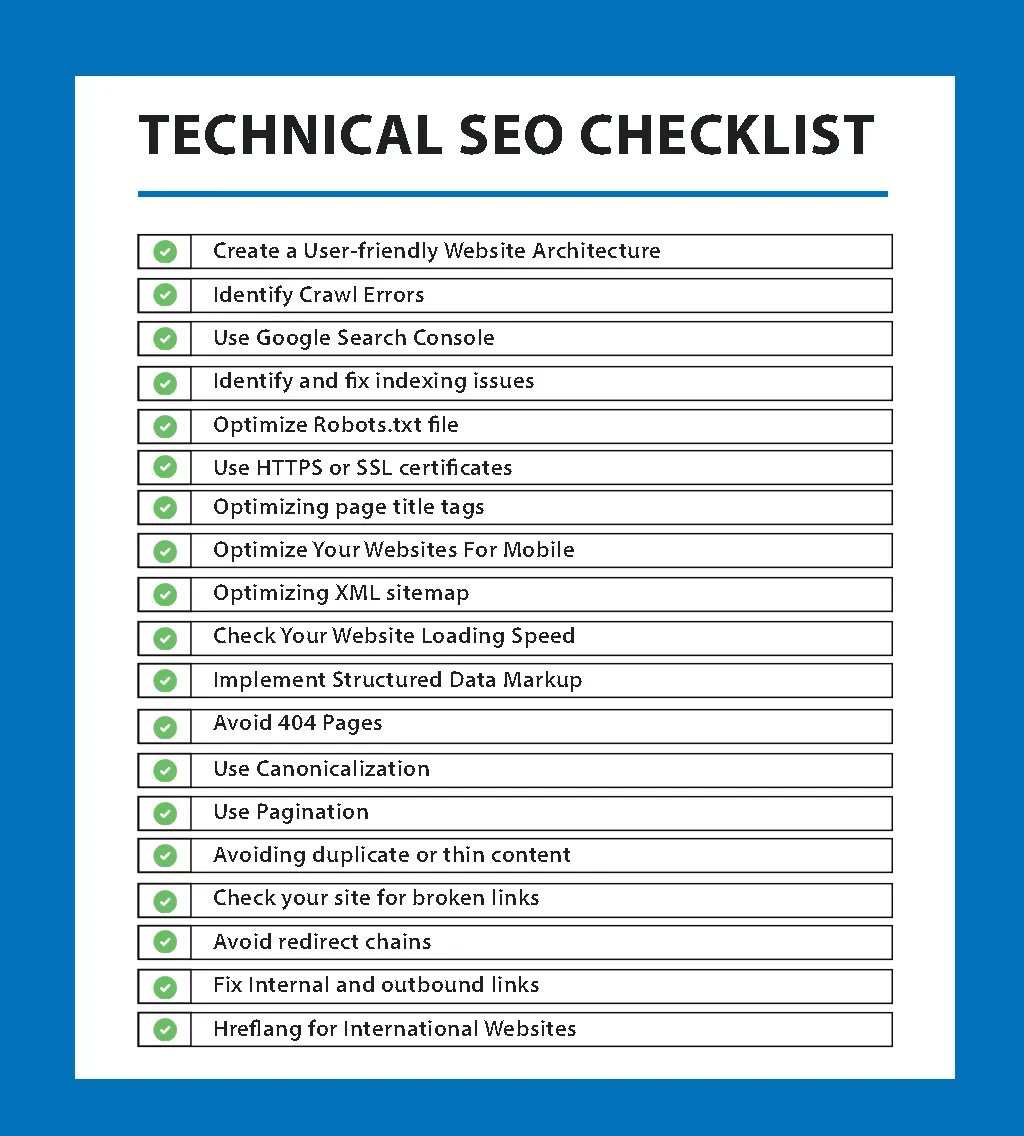
7. Speed Up Website
Fast loading pages is now a critical factor considered by search engines for page rank. Google and human users should be able to load your web pages in 3 to max 6 seconds. First, you must partner with a trusted web hosting service provider, make sure your website code base is well optimised.
Coming to your imageries and videos – you can Compress images before uploading them to your servers. I recommend using WebP images it helps to create small high quality images with faster page load time. What else you can do is host videos away on platforms like (YouTube and Vimeo) from your hosting servers, especially when you’re using a shared hosting server.
A few hosting providers such as 20i do have CDN solution baked into their web servers. A CDN (Content Delivery Network) helps to store copies of your website globally so users can access a copy that is closest to their region, this helps to speed up server delivery and pagespeed across your web pages. See CDN it as a business with multiple locations, and serve their customers by outlets closest to the them.
Penultimately on this section, is the need to Minify your code base ( extra spaces in HTML/CSS/JavaScript files should be removed), JavaScript files optimised and other lines of codes that are not needed removed or replaced with a more optimised snippet.
Finally, Fix all broken links; both image links and internal links. You can do this redirecting broken ones to other working pages. If you have a large page, you can have your web designer write a code function that redirects all 404 pages to closely related pages through the URL string of the page.
8. Mobile friendliness
Most of your web visitors will access the site using a mobile phone, so it cannot be overstated that your website needs mobile-friendliness. Google adjudge your site based on the experience of users on the mobile version. There should be no viewport issues and text must be readable without the need do for users to zoom or drag the screen from end to end irrespective of their type of device.
Other things to pay attention to are clear CTA buttons that are easy to tap, a web layout for mobile that responds to any screen size instantly without the content being messed up. It’s important to test all your web pages on a real smartphone, you can also use the built in responsive tester on the chrome browser under inspect tool to perform this testing.
A Fast and mobile-friendly website = happy visitors.
9. Always Use HTTPS Security
HTTPS is the green lock symbol at the site of your U showing that your web is safe for users. Google chrome and other browsers have since stopped supporting websites without the SSL lock or ones that are poorly configured for SSL.
Make sure all your web pages have SSL, for ssl where necessary for end to end encryption of user data. Your Vital access control pages such as login and signup pages, contact forms, donations, or any user input should have SSL. In fact, SSL should be a sitewide implementation.
Google prefers secure sites and it also helps you to build trust.
Most web hosting providers now offer free SSL as part of your paid plans, and they’re are other ways to get free SSL from platforms like let’s encrypt.
If you want a more premium level of security, dedicated support, and potentially higher levels of trustworthiness, then you may need to opt for SSL premium certificates.

Frequently Asked Questions
What is technical SEO?
Technical SEO is the work of structuring your website so search engines can crawl, understand and rank it: speed, mobile-friendliness, clean URLs, structured data and security.
Is technical SEO important for small businesses in Nigeria?
Yes. Even great content struggles to rank if the site is slow, hard to crawl or not mobile-friendly.
How do I improve my website’s technical SEO?
Speed it up, make it mobile-friendly, fix your URL and site structure, add structured data, and use HTTPS.
Does site speed affect Google rankings?
Yes. Faster pages rank better and keep visitors engaged, especially on the mobile data most Nigerians use.
What is structured data and do I need it?
Structured data (schema) tells Google what your content means and can earn rich results. It is worth adding to your key pages.
Need a website that actually grows your business?
Web Design Nigeria builds fast, SEO-ready websites for Nigerian businesses. Let’s talk about yours.