
Combining WooCommerce with WordPress is one of the most popular ways to build an e-commerce website today.
It is widely embraced because of the open-source nature of WordPress, which means you take personal ownership of your store and run it on the web hosting of your choice. Nobody can lock you out of your own business.
This guide shows you how to create an e-commerce website with WooCommerce, bringing together the important pieces: hosting and a domain, your WordPress and WooCommerce setup, and the plugins you need to handle taxes, shipping and payments. It also covers how to market and grow the store once it is live.
The professional route is to hire a web design agency like Web Design Nigeria to handle everything from setup to launch. Doing it yourself still has costs, though. Hosting, a domain name, an SSL certificate, themes and plugins all need a budget set aside.
A professional web design agency factors all of this in, including technical SEO, which is why e-commerce development can range from a few thousand naira to several million depending on scope.
Why WooCommerce?
The standout feature of WooCommerce is how much it can do without a heavy price tag. Among the many WordPress shopping-cart plugins on the market, the official e-commerce plugin for WordPress delivers one of the most complete sets of features at a competitive cost.
WooCommerce is free to download and use, with no compulsory monthly charge for the core plugin, unlike some other e-commerce solutions.
It is also flexible. Stores built on WooCommerce can achieve the exact design, functionality and user experience an entrepreneur has in mind, and the platform ships with a wide range of built-in features that make setting up and managing a store straightforward.
You can go further by tapping into the huge library of themes and plugins in the WordPress repository, and even integrate third-party tools from outside it. Thousands of WooCommerce themes and plugins are free, while premium versions are available when your project needs more. WooCommerce themes typically cost between $19 and $139, depending on the design and features you want.
That said, smart small-business owners and experienced WordPress developers have learned to build excellent stores without relying on a pile of paid extensions.
Step 1: Get a Domain Name
Just as you register a SIM card to get on a network, you need to register a domain name, such as mybusiness.com.ng, to launch a WooCommerce store.
Tips for choosing a domain name
Here are a few straightforward things to keep in mind when picking a domain name.
- Make it relevant: a good domain should reflect what the website is about. A site about cakes should not have a word like “furniture” in the domain.
- Keep it short and memorable: in over a decade of web development, I have seen many owners reach for long combinations of words so their company feels fully represented. The golden rule, though, is brevity. A short domain is easier to type, remember and return to. Your title tag already explains what your brand does, so a shorter domain is the smarter, more brandable choice.
- Be radically unique and brandable: coining a brand-new word gives you a real advantage. You can usually claim matching social media handles, and you tend to earn sitelinks faster in your early days. Konga, Jumia, Google and Facebook are all examples of radically unique brand names. Generic names struggle with identity once a similar brand becomes popular.
- Include relevant keywords where it helps: for small businesses in a sub-niche, a keyword in the domain can work well. It signals to search engines, quickly, the audience and industry you serve.
- Use .ng or .com.ng for local relevance: if your market is mainly Nigerian, a local TLD helps with local SEO. If you are not sure whether to choose a .ng domain or a .com, read this post.
- Avoid numbers and hyphens: domains with hyphens and numbers are easy to mistype and easy to lose to a competitor. Stick to plain letters.
- Avoid trademarked names: make sure your domain does not infringe on an existing trademark.
Step 2: Get E-commerce-Ready Hosting

Choosing the right web hosting provider is one of the key decisions for your WooCommerce store. Not all hosting works the same way, and for an e-commerce site, performance, security and scalability are non-negotiable.
Aim for a host with a strong uptime record, ideally 99.9% or better. Downtime quietly takes sales away from your business, and in e-commerce every minute counts.
Security matters just as much. Look for a provider that offers e-commerce essentials such as SSL certificates, DDoS protection and daily backups to safeguard sensitive customer data.
Given the demands of an online store, it is worth considering providers like SiteGround, Bluehost or Namecheap, which offer WooCommerce-specific plans tuned for speed and reliability.
Step 3: Install WordPress, WooCommerce and Essential Plugins
Once your hosting is sorted, the next step is to install WordPress, because WooCommerce is the official e-commerce solution built for the WordPress ecosystem.
Most modern hosts offer a one-click WordPress install. After WordPress is set up, you can install WooCommerce, the heart of your store, directly from the plugin repository by going to Plugins in your dashboard and searching for WooCommerce.
WooCommerce alone is not always enough. The extra plugins you need depend on the features you want, but useful additions include Yoast SEO for SEO basics, Wordfence for security, and multilingual or multicurrency plugins if you sell across borders.
After WooCommerce is added, a setup wizard guides you through your first configuration. You can set your country or region, store currency, tax settings and other key business details.
Pay close attention to how your store looks. You want a clean, modern frontend with a good shopping experience. If your budget allows, a quality WooCommerce theme, free or paid, helps you stand out. If you are keeping costs down, lightweight free themes such as Blocksy, Kadence, Astra and OceanWP are highly customisable and offer a clean experience.
Step 4: Set Up Payment Gateways

Payments are central to any online store, so you want a reliable payment system for shoppers. In Nigeria, local options like Flutterwave and Paystack are very popular because they support naira transactions and integrate with WooCommerce with little hassle.
Both also handle international transactions well, which helps if you plan to sell beyond Nigeria. PayPal, Shop Pay, Klarna and Stripe are good alternatives for international customers, though they may require more documentation to set up.
Before you go live, test your payment system thoroughly. Make sure real shoppers find checkout simple and smooth, because technical hiccups at payment cost you sales.
Step 5: Set Up Shipping
Shipping is a vital part of your e-commerce setup. WooCommerce lets you configure shipping zones and methods with its built-in shipping module, whether you offer flat-rate shipping or real-time rates based on the customer’s location.
For a Nigerian store, partner with local logistics providers that offer a plug-in shipping module, such as Kwik Delivery, TopShip and Terminal Africa.
Step 6: E-commerce SEO
Even the best-designed store will not succeed if it is not consciously built for search visibility. E-commerce SEO is essential if you want steady organic traffic from search engines like Google and Bing.
A simple way to start is with competitive analysis and keyword research. These give you a clear view of what your potential customers are searching for, in other words, their search intent.
Once you have your keywords, work them naturally into your product titles, descriptions and URLs. Do not overdo it. Build your store to genuinely serve shoppers, not to trick search engines into sending you traffic.
Step 7: Market and Promote Your Store
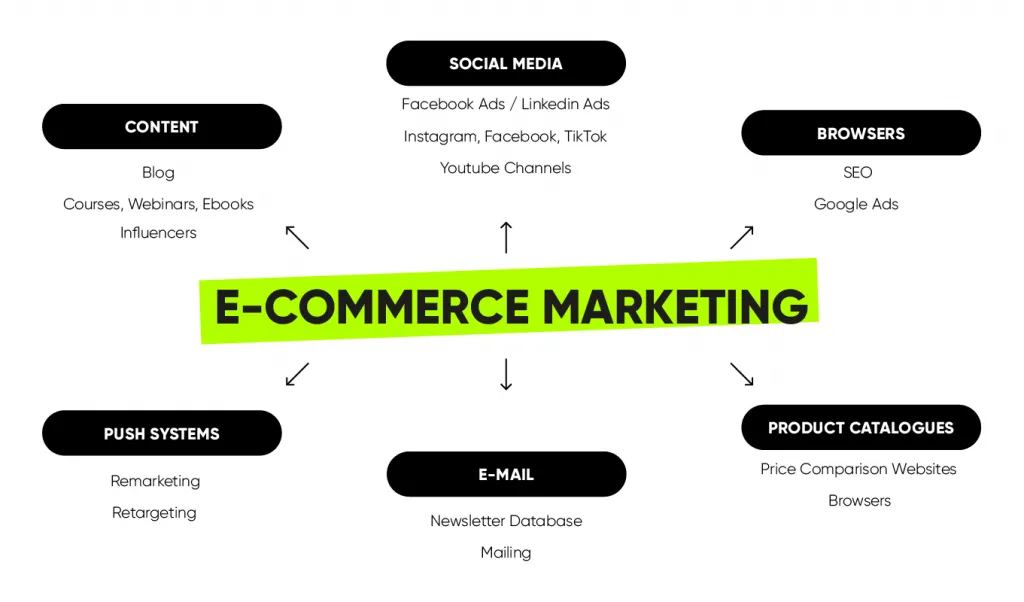
Once your store is live, the next job is to drive traffic. Pay-per-click (PPC) advertising is one of the fastest ways to get visibility. Platforms like Google Ads, Facebook and Instagram let you target specific demographics by interest, behaviour and location.
Another effective strategy is affiliate marketing. Set up an affiliate system so partners can promote your products and earn a commission on every sale they bring in.
Working with social media influencers, bloggers and other marketers is also smart. It can cost more, but the commission you pay can open you up to a much larger audience quickly. In Nigeria, influencers on Instagram and YouTube have large followings that can give your products the visibility they need.
Finally, build a solid content marketing plan. Helpful content in your niche wins the trust of shoppers over time. Shopify is a great example: it used blogs, tutorials and case studies to build trust and attract customers, and today it is a leading e-commerce platform. You can do the same with your WooCommerce store.
Step 8: Manage Your Store and Fulfil Orders
Your WooCommerce store will not run itself. You need systems in place to fulfil orders, handle complaints and manage inventory.
Set up automated notifications and emails so you can track new orders, stock levels and customer queries in real time. Installing the WooCommerce mobile app on Android or iOS also makes managing your store on the go much easier.
Fulfilling orders quickly shows you are an active, proactive business, which grows your customer base. If you can pair reliable, timely delivery with clear communication, you will earn shoppers’ trust quickly.
Good customer service is key for every business, not just e-commerce. Offer support through live chat, email or even WhatsApp, and stay reachable so you can take orders and answer questions.
On the business side, manage your inventory carefully. Avoid over-buying stock, and avoid letting popular items sell out unexpectedly. Either one can disrupt your cash flow or frustrate customers. Staying on top of stock levels is the foundation of long-term e-commerce success.
Frequently Asked Questions
Is WooCommerce free to use in Nigeria?
The WooCommerce plugin itself is free. You pay for hosting, a domain name, an SSL certificate and any premium themes or plugins you choose. You can start small and add paid tools as your store grows.
Can I use Paystack and Flutterwave with WooCommerce?
Yes. Both integrate easily with WooCommerce, support naira payments, and are the gateways Nigerian shoppers trust most. They also handle international cards if you sell abroad.
Do I need coding skills to build a WooCommerce store?
No. You can install WordPress and WooCommerce with a few clicks and use a ready-made theme. If you want a custom, conversion-focused store, a professional web design agency can build it for you.
Which hosting is best for WooCommerce in Nigeria?
Choose a host with strong uptime (aim for 99.9% or higher), SSL, daily backups and good speed. WooCommerce-optimised plans from providers like SiteGround, Bluehost or Namecheap are a safe starting point.
How do I deliver orders across Nigeria?
Set up shipping zones in WooCommerce and connect a local logistics partner such as Kwik Delivery, TopShip or Terminal Africa for reliable, trackable delivery.
Conclusion
WooCommerce gives you a flexible, affordable way to build a real online store you fully own. Follow the steps above, from domain and hosting to payments, shipping, SEO and marketing, and you will have a store ready to sell and grow.
Want it built for you? Our team designs high-converting WooCommerce stores tuned for Nigerian customers. Send your brief to info@webdesigns.ng or message 08114900422.
Need a website that actually grows your business?
Web Design Nigeria builds fast, SEO-ready websites for Nigerian businesses. Let’s talk about yours.